Your team's inbox, answered together.
info@ and support@ in one place. See who's on each mail, write the reply together, and never answer twice.
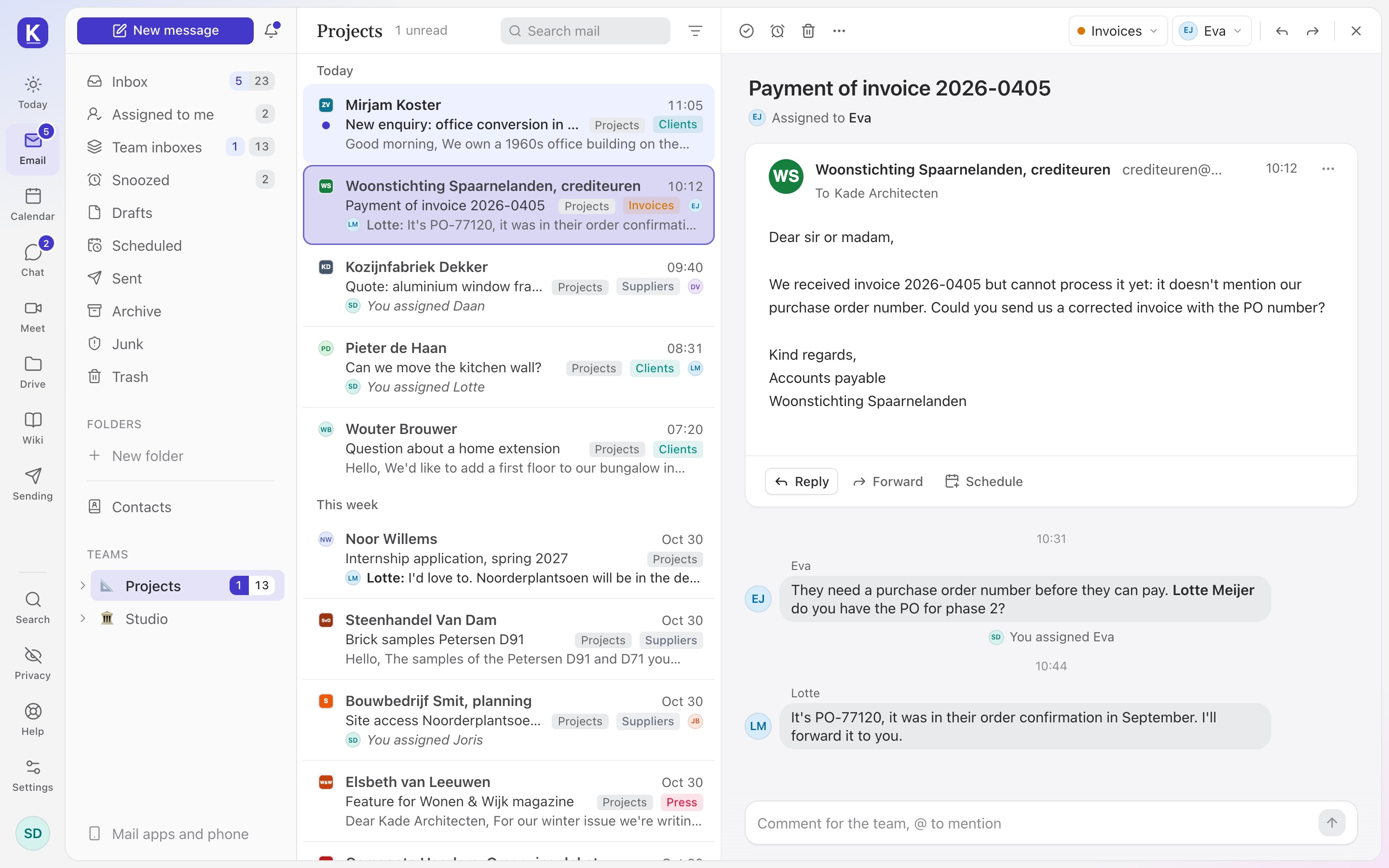
Reply, and it's yours.
- Answer a conversation nobody has, and it's yours. Everyone sees who has what, so nobody answers twice.
- Assign it to someone, and it lands under Assigned to me in their own Inbox.
- Round robin hands out new mail in turn, and skips whoever is away.
One reply, written by the whole team.
- Write in the same reply at the same time, each with your own cursor, as in Docs.
- See who's writing with you, right above the text.
- Anyone can pick it up: an unfinished reply shows on its conversation. Nothing goes out until someone presses Send.
Comments next to the mail.
- Comment beside the conversation. The customer never sees it.
- @mention a colleague to bring them in, right where the question is.
Sorted before you look.
Assign, tag or file new mail as it arrives, for one inbox or all of them.
An automatic answer when nobody's there, once per sender a day.
Tag what a conversation is about, and filter by tag, sender or who has it.
What came in, how fast it was first answered, and what's waiting.
The same signature for everyone's mail, with your logo.
Team inboxes show up in Apple Mail, Outlook and Thunderbird too.
Kept in Europe, and kept to yourselves.
What customers write to info@ and support@ is often the most personal mail a company gets. It stays on servers we run ourselves, in Europe.
On Team and Business.
Shared inboxes come with every plan for a team. You pay per person, not per inbox, and guests are always free.
See pricingPer person, a month
Without VAT. Pay yearly and get two months free.
- TeamShared inboxes, chat, the company drive
- €19
- BusinessPlus single sign-on and the activity log
- €29
Good to know.
Something else on your mind? Write to us and you will hear back from a person.
Can it replace Front, Missive or Help Scout?
For a team answering its own addresses, yes. Assigning, comments, rules and office hours are all there, and it's the same app as your own mail, calendar and files.
Can we keep using Outlook or Apple Mail?
Yes. Team inboxes show up in Apple Mail, Outlook and Thunderbird next to your own mail. Assigning and comments are in Email.eu itself.
Do customers see our comments?
No. They get a reply from the shared address. Comments and who has a conversation stay inside the team.
Is it on every plan?
On Team and Business. Solo is for one person, so there's nobody to share with.
How do we move info@ over?
Make the team inbox, add the address, and bring its old mail along from Gmail, Outlook or any other provider while you keep working. Point your domain to us last.
Answer together, from Monday.
Bring info@ and support@ over and the team starts at once. Your old mail comes along.